Compare two branches in Git
This post will discuss how to compare two branches in Git.
There are several ways to compare two branches in Git:
1. git-diff
We can use the git-diff command to show changes between commits or changes between the tips of the two branches. For instance, the following command will compare the develop branch against the master branch.
Here’s an alternative syntax is which is the same as above.
If the develop branch is omitted, it will have the same effect as using the current branch.
To list all the changes that occurred on the master branch since when the develop branch was started off it, use
To generate the difference between some file in two different branches, you can use:
To generate output to a specific file instead of stdout, you can use the --output option:
You can also redirect the output to a file:
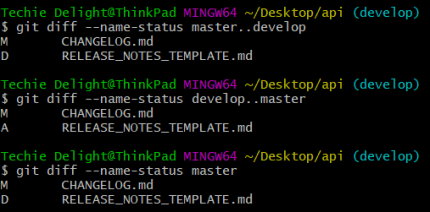
If you only need the names and status of changed files, you can use the --name-status option. The common statuses are Added (A), Copied (C), Deleted (D), Modified (M), Renamed (R). The following command will compare the master branch with the develop branch.
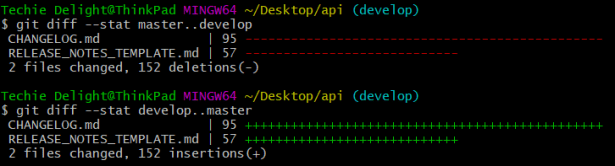
You can use the --stat option to generate a diffstat.
2. git-merge
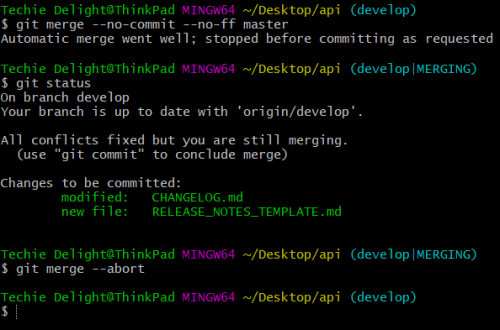
Alternatively, you can do a git-merge with the --no-ff and --no-commit option. This ensures that the current branch is not changed or updated by the merge command.
For instance, the following will merge the master branch to the current branch without committing the changes.
After the merge, you can use Git visual tools like gitk and git-gui to visualize the differences. Once you’re done, you can abort the merge with the --abort option. This will reconstruct the pre-merge state.
3. git-difftool
The git-difftool is a frontend to git-diff that accepts the same options and arguments. It allows you to compare and edit files between revisions.
The following command will compare the develop branch against the master branch.
That’s all about comparing two branches in Git.
Thanks for reading.
To share your code in the comments, please use our online compiler that supports C, C++, Java, Python, JavaScript, C#, PHP, and many more popular programming languages.
Like us? Refer us to your friends and support our growth. Happy coding :)