Delete commits from a Git branch
This post will discuss how to delete commits from a Git branch.
1. git reset
Here, the idea is to force reset the working directory to remove all commits which come after the specified commit and then do a force push:
You can refer to a commit via its ancestry, using its full SHA-1 hash, or providing the partial hash, which should be at least 4 characters long and unambiguous.
git reset --hard HEAD~4
If those commits are present in the remote repository, you will need to force push the hard reset to the remote repository.
git push [-f | --force]
Here’s a live example:

Note that any changes made in the working directory since the last commit are silently discarded. To avoid it, stash your local changes first by calling the git-stash command, which in turn also revert the working directory to the HEAD revision after saving your local modifications. git reset --hard HEAD is often used to delete all uncommitted changes to match the most recent commit in the working directory.
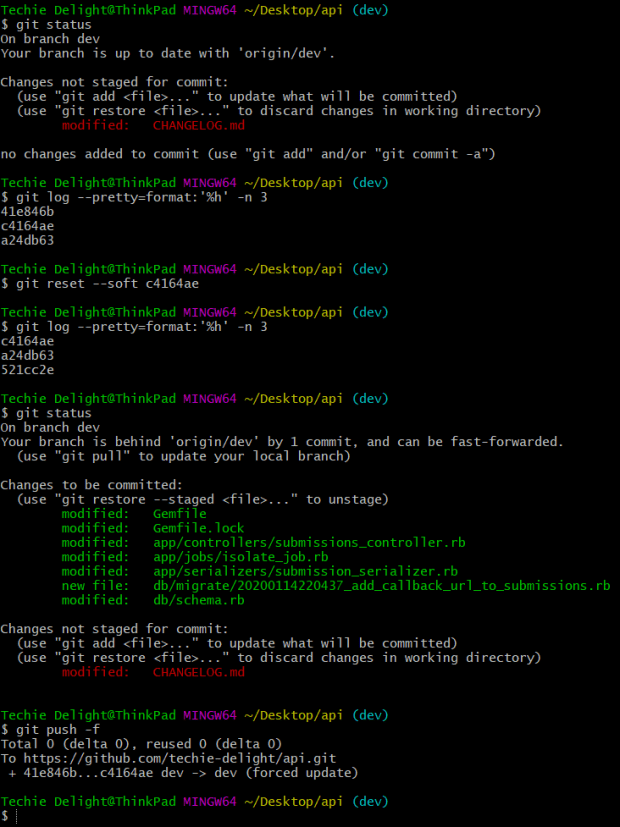
In case you want to keep your work and only undo the commit, you can use the --soft option.
This is demonstrated below:
2. git revert
It is not a good idea to do a force push on a public or a shared repository; do a git-revert instead. It creates a new commit that undoes all the specified commit changes, then applies it to the current branch.
git revert 87859b5
# Push to the remote
git push
Here’s a live example:

3. Interactive Rebasing
Another plausible way of removing comments is using the git-rebase command.
Executing the above command will open up an editor with all the commits in your current branch, which come after the specified commit. To drop a commit, simply replace the command ‘pick’ with ‘drop’ and close the editor. You can also delete the matching line.

The following command will remove an entire commit e78d8b1 in one go using the --rebase-merges mode with the --onto option.

That’s all about deleting commits from a Git branch.
Thanks for reading.
To share your code in the comments, please use our online compiler that supports C, C++, Java, Python, JavaScript, C#, PHP, and many more popular programming languages.
Like us? Refer us to your friends and support our growth. Happy coding :)