Delete remote-tracking branches in Git
This post will discuss how to delete remote-tracking branches in git.
1. git-push
The git-push command is usually used to push local changes to a remote repository but can be used to delete remote branches as well.
We can do this by using git push with the -d option, an alias for --delete. This deletes the specified branch from the remote repository. The full command is:
To get the list of all remote branches, you can use the git-branch command with the -r option, an alias for --remotes. You might want to synchronize first with the remote server using git fetch.
git branch (-r | --remotes)
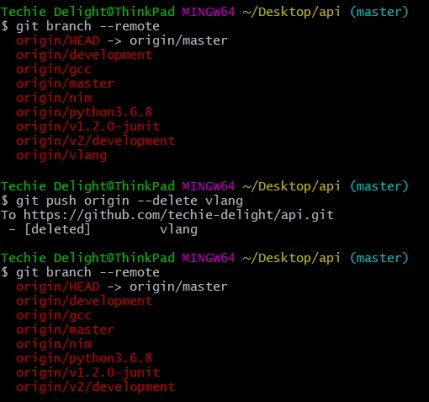
git push origin --delete vlang
This is demonstrated below, where a branch vlang is deleted from the remote server origin.
Alternatively, you can prefix all refs with a colon.
The following command will delete a ref that matches nim in the origin repository.

2. git-branch
You can also delete the remote branches with the git-branch command, using the -r option with the -d option.
This is demonstrated below:

Note that it only makes sense to delete remote-tracking branches if they no longer exist in the remote repository or if git fetch is configured not to fetch them. You can use the prune subcommand of git-remote for cleaning obsolete remote-tracking branches.
Alternatively, you can use the get-fetch command with the --prune option to remove any remote-tracking references that no longer exist on the remote.
That’s all about deleting remote-tracking branches in Git.
Thanks for reading.
To share your code in the comments, please use our online compiler that supports C, C++, Java, Python, JavaScript, C#, PHP, and many more popular programming languages.
Like us? Refer us to your friends and support our growth. Happy coding :)