Determine current branch name in Git
This post will discuss how to determine the current branch name in Git.
There are several ways to get the name of the current branch in Git:
1. git-branch
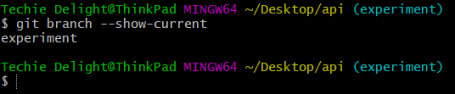
We can use the --show-current option of the git-branch command to print the current branch’s name.
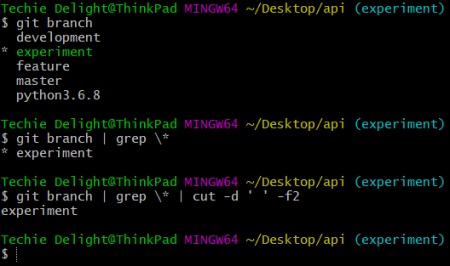
Alternatively, you can grep the output returned by git-branch and extract the current branch name, as shown below:
2. git-rev-parse
Another plausible way of retrieving the name of the current branch is with git-rev-parse. This can be used with the --abbrev-ref option, as shown below:

3. git-symbolic-ref
Another simple and fairly efficient solution is to use the git-symbolic-ref to display the short symbolic reference to the current branch’s HEAD, which is nothing but the current branch name.

4. git-name-rev
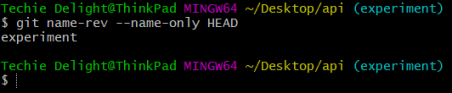
Finally, you can find the symbolic name for HEAD revision of the current branch by git-name-rev when used with the --name-only flag:
That’s all about finding the current branch name in Git.
Thanks for reading.
To share your code in the comments, please use our online compiler that supports C, C++, Java, Python, JavaScript, C#, PHP, and many more popular programming languages.
Like us? Refer us to your friends and support our growth. Happy coding :)