Find differences between two Git commits
This post will discuss how to find differences between two arbitrary commits in Git.
The git diff command is commonly used to get the unstaged changes between the index and working directory. It can be also used to show changes between two arbitrary commits.
To view the changes between two commits, you can provide the commit hashes. The hash can be a full SHA-1 hash or a short SHA-1 hash or ancestry path.
For instance, the following command will list out all the changes made in the last commit. Here, HEAD represents the current branch’s tip, and HEAD^ represents the version before the last commit.
The following is synonymous with the above syntax.
The advantage of using this version is that we can omit either commit here, and it will have the same effect as using HEAD instead. The following will compare with the tip of the current branch by default.
Limit comparison to specified file:
The following will compare with the tip of the current branch but limit the comparison to the specified file.
Generate output to a file:
To generate output to a .diff file instead of stdout, you can use the --output option:
You can also redirect the output to a file:
List only names of changed files:
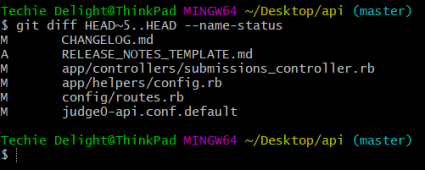
If you only need the names and status of changed files, you can use the --name-status option. The common statuses are Added (A), Copied (C), Deleted (D), Modified (M), Renamed (R).
Here, the HEAD~5 refers to the last 5 commits.
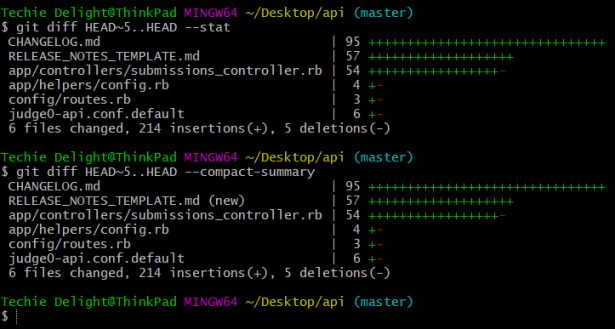
Alternatively, you can use the --stat or --compact-summary option to generate a diffstat.
That’s all about finding the differences between two Git commits.
Thanks for reading.
To share your code in the comments, please use our online compiler that supports C, C++, Java, Python, JavaScript, C#, PHP, and many more popular programming languages.
Like us? Refer us to your friends and support our growth. Happy coding :)